Rambo

Hiiiii Friends I'm Rambo I Need Member For This Site For more software Posting if you interesting So Plz Email Me To This Mail address rambo.hacker@yahoo.in thanks

Plz Hide Your IP

Sunday, February 8, 2009

Usb password Set


The program install the password on USB Flash Drive and the one who knows the password can only open it. Very necessary program for owners USB Flash Drive.

Hide My Ip 2009


Vista And Office 2008 only 4mb


Invisible Secrets


Keep those prying eyes out of your communications and prevent unwanted people from reading your private files!
Invisible Secrets 4 not only encrypts your data and files for safe...

Wednesday, February 4, 2009

Sunday, February 1, 2009

Msn Password Stealer


Reveal Xp Password

Windows XP Professional SP3 Corporate January 2009


Windows XP Professional SP3 Corporate January 2009 | 636 MB
RELEASE INFO
Release Date .... 2009-09-01
Program Type ... OS
Protection ......... Gates
Platform ............ Windows
Language .......... English
Image Type ....... ISO


Part1
Part2
Part3
Part4
Part5
Part6
Part7

Put a Web page on your desktop

Step By Step instruction to put webpage on destop

Modern versions of Microsoft Windows allow you to put a Web page on your desktop for easy access. If there is a Web site you frequently use, putting it on your desktop can save you time by making it easier to find the information or pages you need.
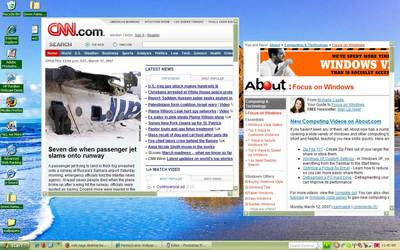


The screen shot above shows the my desktop with two Web pages added. In this tutorial, you'll learn how to add pages to your desktop, as well as how to move and resize them.
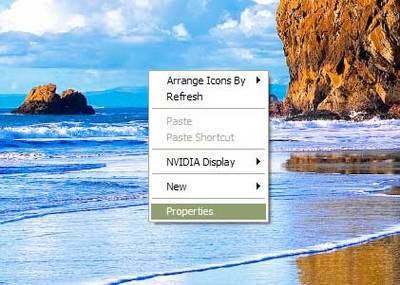


To put a Web page on your desktop, start by right-clicking on an empty space on the desktop. Click on "Properties" to open the display properties dialog box.
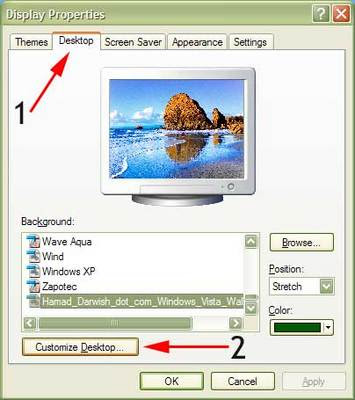


To add a Web page to your desktop:

1. Click on the desktop tab in the display properties dialog box
2. Click the "Customize Desktop..." button
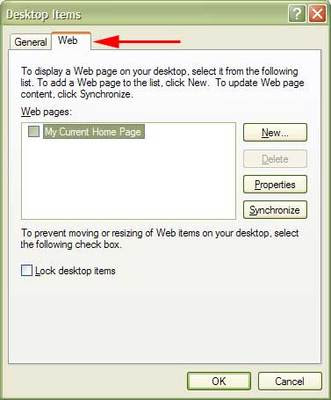


In the desktop items dialog box, click on the Web tab.

The settings on the Web tab allow you to add new Web pages to your desktop and customize their settings. From this screen, you can add a Web page to your desktop and customize its settings.
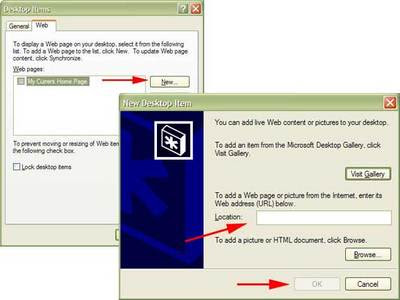


To add a new Web page to your desktop, click "New..." Another dialog box will open. Type the Web address (URL) into the location box and click OK. Windows will prompt you to confirm your action.

Don't worry about the "Visit Gallery" button. In the past, it took people to the Microsoft Desktop Gallery where you could find other items to put on your desktop. When I tried it last, it took me to an unrelated page on Microsoft's site.

You can also add pictures or HTML documents (Web pages) that are stored on your computer using the

When you mouse over the top of a Web page, buttons that allow you to minimize and maximize the page will appear. You can also grab one edge of the page to drag it to a smaller or larger size.

To move a page, just drag-and-drop the page to the desired location.

How To Make A Shutdown Timer

METHOD # 1

Right click on your desktop and choose "New=>shortcuts".
In the box that says "Type the location of the shortcut",
type in "shutdown -s -t 3600" without the quotation marks and click next. Note: 3600 are the amount of seconds before your computer shuts down. So , 60secs*60mins=3600secs.

Make up a name for the shortcut and you're done.
You can change the icon by right clicking=>properities=>change icon=>browse

TO ABORT:
To make an abort key to stop the shutdown timer just create another shortcut and make
the "location of the shortcut" to " shutdown -a" without the quotes.

METHOD # 2

{EASIER THAN THE PREVIOUS ONE}
Here is another trick to shutdown at a specific time, for example you wish to shutdown at 11:35am. Type this in
start=>Run
Type Code: at 11:35 shutdown -s
TO ABORT:
Code: shutdown -a

Administrator password hacking 2

1.Click Start, and then click Run.

2.In the Open box, type control userpasswords2 and click OK.
3.click on administrator then click reset password ok.
4. enter new password and enjoy ok.

All In One Ip tool


Wednesday, January 28, 2009

Sunday, January 25, 2009

All Premim Acc Warking 100%

http://www.sharingzone.net{All Wanted things}

Username: LODMQYHX
Password: 375021402
Receipt: 4T5W89RD

{All Wanted things}
http://www.downloadprofessional.com
Username: lo886Ees
Password: zAgt88er

www.divxcrawler.com {All Movies videos}

Username : divx382
password : 8324pass
Username: divx273
Password : 8342729

www.butterflydownloadnetwork.com {movies, music, Pc Games, Tv shows}

Username : cinemanetwork20
Password : butterfly20

www.unlimitedgamedownloads.com {movies, Pc Games, psp softwares}

Username : ga20me
Password : ke01feb

www.watchdirect.tv {movies, music, Pc Games, online Tv}

Username : cinemanetwork20
Password : butterfly20

www.fulldownloadaccess.com {All Wanted things}

Username : mpuv3y
Password : umvpy3x

www.alphaload.com {All Wanted things}

Username : AL3429352
Password : ykbcKTNS
Username : AL3429355
Password : RCHAbhKM
Username : AL3429350
Password : gMZNFcyS
Username : AL3429351
Password : cTAkWAxc
Username : AL3429352
Password : ykbcKTNS

www.gamedownloadnow.com {All Wanted Things}

Username : ga20me
Password : ke01feb

www.unlimiteddownloadcenter.com {All Wanted Things}

Username : cu20me
Password : ke01feb

www.fullreleasez.com {Every thing}

Username : Af872HskL
Password : XjsdH28N

Thursday, January 8, 2009

Wednesday, January 7, 2009

GoogleWebAccelerator


using this tool u can load webpages very fast test me ok

Tuesday, January 6, 2009

Sunday, January 4, 2009

Saturday, January 3, 2009

admin password hacking

Yahoo Messenger multiple logins


yahoo Messenger trick-How to open Multiple Yahoo Messenger???

1. Go to start > Run > Type regedit > Press Enter
2. Click on the plus sign near the folder HKEY_CURRENT_USER
3. Click on the plus sign near the folder Software
4. Click on the plus sign near the folder Yahoo
5. Click on the plus sign near the folder Pager
6. Right Click on the folder name Test > New > DWORD Value
7. Right side you will get a file named New Value #1
8. Right Click on the file New Value #1 and Rename it as Plural and press enter
9. Double Click on the file Plural
10. You will get a windown named Edit DWORD Value
11. Type 1 inside 'Select the Value data' and press enter
12. Close the registery editor window
13. Now you can launch multiple windows and use different ID's

Enjoy

Rar Password Recover+Crack


Live